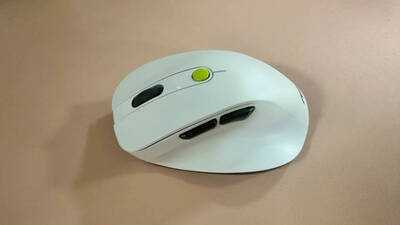
A good wireless mouse does not need to be packed with features to make everyday computing more comfortable. It needs to feel good in the hand, respond reliably to movement, offer convenient connectivity and last long enough to avoid frequent interruptions. The Asus Wireless Mouse MD105 aims to deliver on these basics while adding a sleek design and a few useful extras. Priced at Rs 1,699, the mouse sits in an accessible price segment for users looking for a dependable everyday accessory. We used the device for a while and here’s what we think
Design and ergonomics: Comfortable for everyday work
The Asus MD105 stands out with its streamlined shape and smooth contours. Instead of the conventional, utilitarian look of many office mice, it has a more refined appearance that fits naturally into a modern workspace. It is available in Volt Green and Milky White, giving buyers a choice between a more distinctive colour and a cleaner, understated finish. We received the Volt Green one for review. Both options can complement a laptop-based workstation without looking out of place.
Its built-in thumb rest gives the thumb a dedicated resting area, helping make the mouse more comfortable to hold during everyday use. The overall shape is suited to productivity-focused setups, although comfort will naturally depend on hand size and grip style. 
For anyone spending several hours working on a laptop or desktop, mouse comfort can make a noticeable difference. The MD105 features an ergonomic design intended to support the hand during extended use. The thumb rest is a useful addition, while the two side buttons provide extra control without requiring users to rely entirely on the primary clicks and scroll wheel. These buttons can be particularly handy for navigation and other supported shortcuts, depending on the application and configuration.
Performance: Quiet clicks and smooth movement
One of the MD105's more practical features is its low-noise clicking mechanism. Quieter clicks can be useful in shared offices, libraries or at home when other people are working nearby. They also make the mouse less distracting during long work sessions.
The PTFE feet are designed to help the mouse glide smoothly across a suitable surface. In daily use, smooth movement is important for navigating documents, selecting text and working across multiple windows without feeling that the mouse is dragging against the desk.
The adjustable sensor resolution offers three settings: 1,200, 1,600 and 2,400 DPI. Lower settings can provide more controlled movement, while higher settings allow the cursor to travel farther with less physical movement.
The MD105 supports both 2.4GHz wireless connectivity and Bluetooth, giving users flexibility in how they connect it to their devices. This is particularly useful for people who work across a laptop, desktop or another compatible device. The mouse supports switching between up to three devices, reducing the need to keep separate mice for different setups.
Battery life: A practical consideration
Battery life is an important factor when choosing a wireless mouse, particularly for people who use one throughout the workday. With weeks of battery life, Asus MD105 is a dependable choice.
Verdict
At Rs 1,699, the Asus MD105 offers a reasonable combination of design, comfort and everyday functionality. Its dual-mode wireless connectivity, support for up to three devices, quiet clicks, PTFE feet and adjustable DPI settings give it a useful set of features for regular computing. Its biggest appeal lies in the balance it strikes between appearance and practicality. The ergonomic shape and thumb rest add to everyday comfort, while the quieter clicks and multi-device support are useful conveniences rather than features that exist merely to inflate the specification sheet.
There are a few things to keep in mind. The mouse is primarily aimed at productivity, and buyers looking for advanced gaming controls or verified long-duration battery performance may want to consider more specialised options.
For users who need a stylish, comfortable wireless mouse for work, study and everyday browsing, however, the Asus MD105 is a sensible option.
Contact to : xlf550402@gmail.com
Copyright © boyuanhulian 2020 - 2023. All Right Reserved.